
Core Gameplay Loop
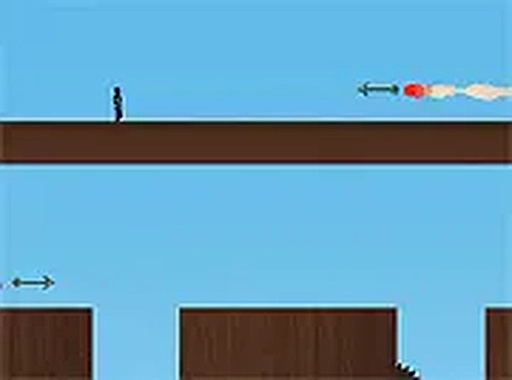
Twilight Trail Runner centers on guiding a character through a series of obstacle courses. Each stage presents a unique arrangement of hazards, such as spikes and moving surfaces. The player must time jumps and directional movements carefully to avoid setbacks. Success depends on learning the rhythm of each obstacle and executing precise inputs. The game rewards patience and repetition, as mastering a stage often requires multiple attempts.
Unlockable Moves
As players progress, they gain access to new movement abilities. These are not given all at once but appear after completing certain milestones. Each new ability changes how the player approaches upcoming obstacles, requiring them to adapt their strategies. For example, a double jump might allow reaching higher platforms, while a dash could help clear wide gaps. This gradual introduction keeps the gameplay fresh without overwhelming the player.
Stage Design Philosophy
The levels in Twilight Trail Runner are designed to test specific skills. Early stages focus on basic jumping and timing, while later ones combine multiple hazards in complex patterns. The difficulty curve is steady, with each new stage building on lessons from previous ones. Environmental elements, such as moving blocks and collapsing floors, add variety and require constant attention. The design encourages players to develop a sense of rhythm and spatial awareness.
Visual and Audio Atmosphere
The game uses a clean, minimalist visual style that emphasizes clarity. Obstacles and platforms are clearly distinguishable from the background, helping players react quickly. The color palette shifts slightly between stages, providing visual variety without distraction. Background music and sound effects provide audio cues for actions like jumping or landing, which can aid timing. The overall presentation supports focused gameplay without unnecessary clutter.
Accessibility and Setup
Twilight Trail Runner runs directly in a web browser and requires no downloads or installations. It is designed for desktop computers and supports full-screen mode for a more immersive experience. Controls are handled via keyboard, typically using arrow keys or WASD. The game is free to play, with no in-game purchases or ads that interrupt gameplay. This straightforward setup makes it easy to start playing immediately.


Comments
0 comments